
Generate SEO-ready meta descriptions in seconds
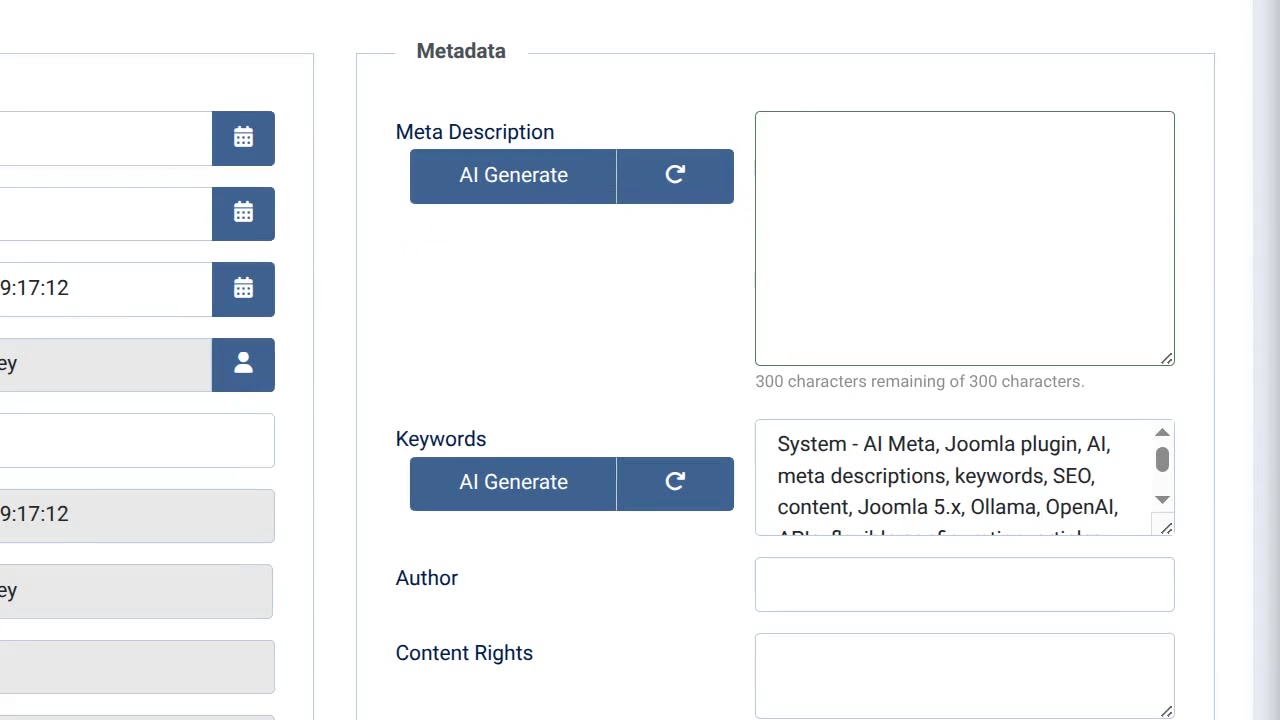
Writing meta descriptions for every article on your Joomla site takes forever, and let's be honest - you usually skip it or write something lazy. System - AI Meta generates professional, SEO-optimized meta descriptions and keywords automatically using AI. Click one button, and your content gets proper meta tags that actually help your search rankings.
Overview
Proof
- Free and open source - No subscription fees, no limits
- One-click generation - Literally just click "AI Generate" in your admin panel
- Works with your AI - Supports Ollama (free, local) and OpenAI-compatible APIs (everyone else)
- Active development
How It Works
You connect the plugin to an AI service (like Ollama running on your computer, or OpenAI's API), then create prompts that tell the AI how to write your meta descriptions. The plugin uses dialog-based prompting - you set up a conversation template once, using placeholders like %title% and %article%. After that, when you're editing an article in Joomla, you click "AI Generate" and the plugin fills in your template with the actual content and sends it to the AI. If you don't like the result, click "Regenerate" and tell it what to change.
Features
- One-click generation - Button appears right in your article editor, no jumping between screens
- Dialog-based prompting - Use advanced prompt engineering techniques to get exactly the output you want
- Example prompts included - Working configurations for meta descriptions and keywords provided in documentation
- Local AI support - Use free Ollama on your own computer, no API costs or privacy concerns
- Smart regeneration - Don't like the result? Click regenerate and tell it "make it shorter" or "more professional"
- Works everywhere - Articles, contacts, custom fields - if it has meta fields, this handles it
- No vendor lock-in - Compatible with any OpenAI-style API, swap providers anytime
- Privacy-friendly - Use local AI models, your content never leaves your server
- Customizable prompts - Fine-tune exactly how the AI writes your descriptions
- Joomla-native - Built specifically for Joomla 4+, follows all the platform conventions
The plugin is completely free. If you use Ollama (also free), you have zero ongoing costs. If you use OpenAI's API, you pay their rates—usually pennies per article. You configure an AI connection (endpoint URL, maybe an API key) and create prompts using dialog-based prompting. The documentation includes working example prompts you can copy and customize. If you've used ChatGPT, you already understand the concept. Most people are generating meta descriptions within 20 minutes. You control the prompts and can regenerate instantly if you don't like something. You're still in charge, the AI just saves you time writing the same type of content over and over. If you can install a Joomla plugin, you can use this. The hardest part is installing Ollama if you want free local AI, and that's literally one installer download. Running AI prompts on low power machines requires a longer timeout waiting for responses.Frequently Asked Questions:
Does this cost money?
Is this hard to set up?
Will this write garbage AI content?
Do I need technical knowledge?
What does the timeout setting do?
Download
Technical Details
For the Technically Curious
AI Service Support:
- Ollama (local, self-hosted AI models)
- OpenAI-compatible APIs (OpenAI, Azure, Together AI, Groq, etc.)
- Multiple connection support for different models/providers
Joomla Compatibility
- Joomla 4.x, 5.x, 6.x
- PHP 8.1+
- Requires cURL extension for external API connections
Context Support
- com_content.article (articles)
- com_contact.contact (contacts)
- Custom fields via placeholder syntax
Advanced Features
- Customizable prompts with placeholders (%title%, %article%, %keywords%, %#jform_field_id%)
- Temperature control for output creativity (0-2 range)
- Knowledge file integration for additional context
- Model caching for improved performance
- Session validation and ACL protection
- Regeneration with contextual feedback
- Configurable timeout for long-running prompts
Prompt Placeholders
- %title% - Article/contact title
- %article% - Full article text content
- %keywords% - Existing meta keywords
- %#jform_field_id% - Custom field content by field ID
Example Prompt Configuration
System:
Generate a meta description (120 to 160 characters) for an article with the title "%title%" and content "%article%". The description should be compelling, include relevant keywords naturally, and encourage clicks from search results.
User:
Create a meta description.
Security
- Session-based authentication for all API requests
- ACL (Access Control List) checks for authorized users only
- API keys stored in plugin configuration (encrypted by Joomla)
- User authorization validation before generation


